1
Basic Operations
ITIJ
o
DISPLAY
SLEEP
POWER
Button
Description
POWER
Press to turn on and off the TV.
[12) WIDE
0
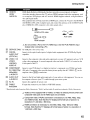
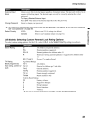
Press repeatedly to step through the Wide Mode settings: Wide
Zoom, Normal, Full, 16:9 and Zoom. The Wide Mode settings
can be also accessed in the Screen settings. See page 27.
FAVORITES
c:::J
Changing the Wide Screen Mode (see page 27 for details)
(
16:9 Original source
Standard definition source
High definition source
[[]]
ILlJ B08
Wide Zoom
Wide Zoom
•
MENU )
cc
4:3 Original source
JUMP
~
16
CD®®
0®®
0®®
Normal
[[]]
Full
00S
~
DD
~
16:9
CH
VOL
Zoom
[]d
MUTING
CO
tl:n
SONY
it
[j]]
This mode is not available
Normal
This mode is not available
Full
ILlJ B08
16:9
(QJgQg
Zoom
[]dO]
Wide Zoom and Normal are not available when you
are watching 720p or 10aOi source from component
video input or 720p, 10aOi or 10aOp source from
HDMI input.
Press to display the list of Inputs. Press repeatedly to toggle
through the inputs.
INPUT
[H] ..1+1.1.
•
0
tl:n
Inputs can be changed by pressing ..1+ and
while the list of Inputs is displayed.
t6J
See page 33 on setting up the Inputs labels,
including the Skip feature.
Press ..1+1.1. to move the on-screen cursor. Press
select/confirm an item.
0
0
to
B] TOOLS
Press to display the Tools Menu that is associated with your
current input: Analog TV, Digital TV or external inputs (see
pages 25,26,30 and 34).
[J]]
Press to jump back and forth between two channels. The TV
alternates between the current channel and the last channel that
was selected.
JUMP
(Continued)
21
•