1
UK
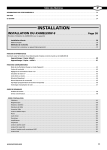
Table of Contents
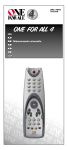
PICTURE OF ONE FOR ALL REMOTE
3
THE KEYPAD
4
INSTALLATION
Set-Up using the barcode reader
Set-Up by barcode number
The Search Method
Blinking back your SET-UP CODE
6
7
8
8
ADVANCED FEATURES
Colour, Brightness and Contrast
Auto Scan
Sleeptimer
ONE FOR ALL Sleeptimer
ONE FOR ALL Recall (Previous Channel)
Key Magic
9
9
9
10
10
11
TROUBLE SHOOTING
Helpful Hints
Customer Service
11
12
Installing the Batteries
Your ONE FOR ALL needs 2 new “AA/LR6” alkaline batteries.
1.
Remove the battery cover from the back.
2.
Match the batteries to the + and - marks.
3.
Press the battery cover back into place.
Important notes:
- In order to avoid having to reprogram your ONE FOR ALL after
you remove the batteries, you will need to insert new batteries
within 5 minutes. Also it is best that you do not use rechargable
batteries.
- On the inside of the battery compartment door you will find a
label on which to write your SET-UP CODE after your ONE FOR
ALL is set up for your television. Please write down your SET-UP
CODE for easy, future reference.
WWW.ONEFORALL.COM
2