1
Step 1: Connect the transmitter
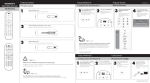
Start with the HDWT-Tx transmitter,
which is the smaller of the two components in the system. You can lay it flat
or mount it upright on its stand. Make
sure it’s placed a couple of feet away
from the other electronics.
Connect the included 6-foot
HD cable to the back of the
transmitter, then to the HD
output of a Blu-ray player, DVD player,
cable box or satellite receiver. Make
sure the device is powered up and
playing.
Now connect the small
coaxial plug from the AC
adapter to the transmitter,
and plug the AC adapter into a wall
outlet or a power strip. The green LED
on the front of the transmitter marked
Power should light up.
Step 2: Connect the receiver
First, remove the cover on the underside of the receiver, which is held
in place by a screw.
Connect the included 15foot HD cable to the HD
jack on the underside of
the receiver. Connect the other end
to one of the HD inputs on the TV.
Turn on the TV and select the HD input you used to connect the receiver.
Now plug the included AC
cord into the AC power
input on the underside of
the receiver, near the HD jack. Plug
the other end of the power cord into
a wall outlet or power strip.
All three green LEDs on the front of
the transmitter marked Power, Video
and Link, should light up then on the
receiver, Power and Link will remain
on. The Link light may take up to 60
seconds to go on.