1
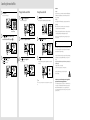
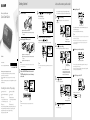
Searching the recorded files 1 Precautions Press SEARCH. The date selection screen appears. Playing back the searched file Erasing the searched file 1 1 Press to start playing back. The selected file starts playing back. Press ERASE. “Erase?” appears and the specified file is played back for confirmation. On power Operate the unit only on 3.0 V or 2.4 V DC. Use two LR03 (size AAA) alkaline batteries or two NH-AAA rechargeable batteries, or connect DC IN 3V jack to a wall outlet using an AC adaptor. On safety Do not operate the unit while driving, cycling or operating any motorized vehicle. On handling Do not leave the unit in a location near heat sources, or in a place subject to direct sunlight, excessive dust or mechanical shock. 2 Should any solid object or liquid fall into the unit, remove the battery and have the The recorded date box unit checked by qualified personnel before operating it any further. Press or to select the date when you recorded the desired file, then press . 2 Press VOL +/– to adjust the volume. 2 Press or to select “YES.” If you have any questions or problems concerning your unit, please consult your nearest Sony dealer. Do not install AC adaptor in a confined space, such as a bookcase or built-in cabinet. As the main plug of AC adaptor is used to disconnect the AC adaptor from the mains, connect it to an easily accessible AC outlet. Should you notice an abnormality in it, disconnect it from the AC outlet immediately. 3 Press Press Press or to select a file. to select a more recent file. to select an earlier file. 3 Press to stop the playback. The selected file stops. 3 Press . The “Erasing...” animation appears in the display window and the selected file will be erased. To reduce the risk of fire or electric shock, do not expose the AC adaptor to dripping or splashing, and do not place objects filled with liquids, such as vases, on the AC adaptor. Capacity of the supplied SD memory card with the memory card recorder (User available capacity) 2 GB (approx. 1.80 GB = 1,932,734,976 Byte) A part of the memory capacity is used as a management area. To prevent possible hearing damage, do not listen at high volume levels for long periods. Hint When a file is erased, the remaining files will advance so that there will be no space between files. Notice for the customers: the following information is only applicable to equipment sold in the countries applying EU directives The manufacturer of this product is Sony Corporation, 1-7-1 Konan Minato-ku Tokyo, 108-0075 Japan. The Authorized Representative for EMC and product safety is Sony Deutschland GmbH, Hedelfinger Strasse 61, 70327 Stuttgart, Germany. For any service or guarantee matters please refer to the addresses given in separate service or guarantee documents.