1
Symfony WebPal® 10
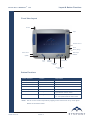
Layout & Button Functions
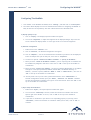
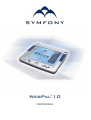
Front-View Layout
Antenna
Stylus
Network Connect
Power
Battery Charge
Power Input
Power Switch
USB Port
Speaker
Scroll
Tool
Microphone
Compact
Flash Bay
Headphone
Socket
Function Buttons
(see below)
Button Functions
Button Functions
Location
Requirement
Soft Keyboard
Left Most (K)
Enable/Disable
E-mail
Second from Left
Open/Close
Desktop
Third from Left
Open/Close
‘Home’ URL
Right Most
Jump to default URL
Rocker key
Left Side
Vertical scroll
Sleep mode*
Left Edge Side
Manual start/stop – Pull/
Quick Release of Power Switch
Power off/on
Left Edge Side
Off – Pull and Hold power switch for 4 sec.
On – Pull/Quick Release of Power Switch
* Note: You can recover from Sleep mode by tapping on the touch screen or by a Pull/Quick
Release of the Power Switch.
User Manual
Page 3