1
Switching the system on
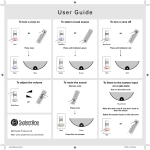
There are two ways of switching the system on...
Volume
Up
➊
Volume
Down
➋
Mute
Standby Screen
➊Press the “power” button (hard button on top left hand side of
screen) and it will switch the zone on and select input 1 which
is normally a radio tuner – so by doing this, you will always hear
something.
➋Press the “Home” button (hard button on bottom left hand side of
screen) to go to the Home page and from there, select the source
you want to watch or listen to.
Note: Source symbols are normally displayed in blue. If a source symbol is
displayed in orange, it means that the source is already being used
by another person in another location. You can go ahead and listen,
but it would be polite not to change stations or tracks.
Page