1
C H A P T E R
4
TROUBLESHOOTING
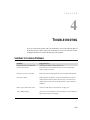
If you are experiencing trouble with your touchmonitor, refer to the following table. If
the problem persists, please contact your local dealer or our service center. Elo Technical Support numbers are listed on the last page of this manual.
Solutions to Common Problems
Problem
Suggestion(s)
The monitor does not respond after
Check that the monitor’s Power Switch is on.
you turn on the system.
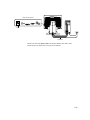
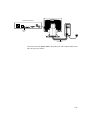
Turn off the power and check the monitor’s power cord and signal
cable for proper connection.
Characters on the screen are dim
Refer to the Controls and Adjustments section to adjust the brightness.
The screen is blank
During operation, the monitor screen may automatically turn off as a
result of the Power Saving feature. Press any key to see if the screen
reappears.Refer to the Controls and Adjustments section to adjust the
brightness.
OSD or power buttons don’t work
Check to see that they are not locked out. See page 3-33.
“Out of Range” display
check to see of the resolution or vertical frequency of your computer is
higher than that of the LCD display.
4-33