1
E100 OWNER’S MANUAL
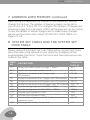
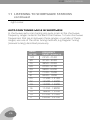
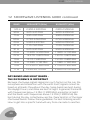
8 SYSTEM SET CODES AND THE SYSTEM SET
CODE TABLE continued
CODE
NO.
DESCRIPTION
SHOWN IN
DISPLAY
29*
Normal AAA battery to be used
1.5
76*
Set the FM frequency range to 76-108MHz (Japan)
76 108
88*
Set the FM frequency range to 87-108MHz (N. America; Western Europe)
87 108
CHANGING SYSTEM SET CODES
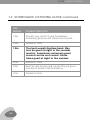
To enter a system code of your choice, use the procedure below.
1. Turn off the radio.
2. Press/release the ‘Sys. Set’ button (13). Note that ‘- - ‘ (41)
appears in the upper right corner of the display and the clock
digits disappear.
3. Within 5 seconds, enter the desired numeric code with the
numeric key pad, then immediately press/release the button
labeled ENTER. The code ICON (42) will briefly appear in the lower
right corner of the display.
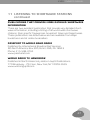
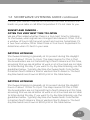
CHANGING THE CLOCK FROM 24 TO 12 HOUR
FORMAT – AN EXAMPLE OF CHANGING A SYSTEM SET CODE
The instructions below serve as an excellent example of how to
change a system set code, in this case changing the clock system to
a 12 hour format:
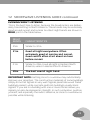
1. Turn off the radio.
2. Press/release the ‘Sys. Set’ button. Note that ‘- - ‘ appears in the
upper right corner of the display and the clock digits disappear.
19