1
Chapter 5 Administration
Setting Security
Setting Security
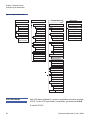
You can add security to the front panel by password-protecting the
autoloader's functionality. The security setting only protects the front
panel functionality. The default setting is Off, meaning that no password
is required. However, you can enable the security option so that users
must enter a password to access functionality.
When you first power on the autoloader, the security option is set to Off.
Use the following procedure to enable the security option. You must
have an administrator-level password to set passwords.
To set the security option:
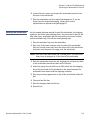
1 From the main menu, scroll to Configuration, and then press Enter.
2 From the Configuration menu, scroll to Security. If a check mark
appears after the word, the security option is On. If no check mark
appears, the security option is Off.
3 To change the option, press Enter. For example, if the security option
was set to On, it is now set to Off, and no check mark appears.
Setting Magazines
In some cases, autoloader owners were being charged Independent
Software Vendor (ISV) licensing fees for two-magazine SuperLoader 3s
although only one magazine was configured. This occurred because the
ISV software was registering the autoloader as a two-magazine device,
regardless of the number of magazines configured. You have the ability
to set the number of magazines in the autoloader.
To set the number of magazines:
1 From the main menu, scroll to Configuration, and then press Enter.
2 From the Configuration menu, scroll to Magazines, and then press
Enter.
3 From the Magazines menu, select either Right, Left, or Both to
indicate the magazines installed in the autoloader.
Quantum SuperLoader 3 User’s Guide
73