1
DLT-V4 Tape Drive Quick Start Guide
13 USB Tape Drives Only — You must use a SATA data
cable and a SATA-to-USB adapter. Please follow the
installation instructions in the SATA-to-USB Adapter
Installation Guide included with the adapter (also
located on the resource CD.
4 Download the device driver from the following Web
site: http://www.quantum.com/ServiceandSupport/
SoftwareandDocumentationDownloads/DLTV4/
Index.aspx.
5 Shut down and power off the host and all peripheral
devices attached to the selected host.
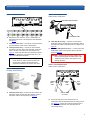
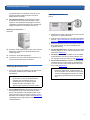
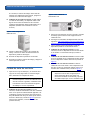
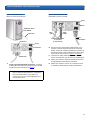
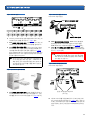
Figure 5 Securing the Tape
Drive
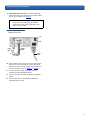
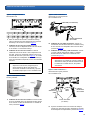
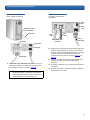
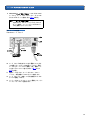
6 SCSI Tape Drives Only — If necessary, install an LVD/SE
host bus adapter in the server or workstation (see
figure 7).
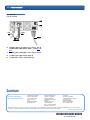
7 SCSI Tape Drives Only — Connect the SCSI cable to the
tape drive and to the SCSI host bus adapter — or to the
previous device on the SCSI bus (see figure 7).
8 SCSI Tape Drives Only — Connect an active LVD/SE
terminator onto one end of the tape drive, if it is the
last or only device on the SCSI bus (see figure 7).
NOTE: If the tape drive is not the last or only device
on the SCSI bus, make sure the last device on
the SCSI bus is properly terminated and is
powered on whenever you use the tape drive.
14 Install the cover on the server or workstation. Connect
the power cables to any attached peripheral devices.
15 Power on any attached peripheral devices.
16 Power on the server or workstation and allow its
operating system to start.
Tabletop Tape Drive
Figure 7 Connecting the Cables
— SCSI Tape Drive
0
1 Inspect the shipping box and contents of the box for
damage. If you find any damage, report it to the
shipping company.
NOTE: Save the packing materials in case you need
to move or ship the tape drive. You must ship
the tape drive in the original or equivalent
packing materials to preserve your warranty.
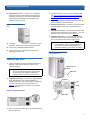
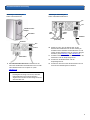
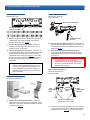
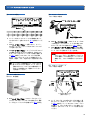
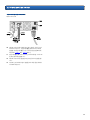
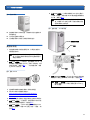
2 SCSI Tape Drives Only — If necessary, change the SCSI
ID for the tape drive. Use a small screwdriver or
ballpoint pen to press the buttons above or below the
SCSI ID to increase or decrease the number (see
figure 6). (For complete instructions, see the DLT-V4
Product Manual.)
LVD/SE host bus
adapter
SCSI cable
Terminator
On
Off
Figure 6 Changing the SCSI ID
SCSI cable
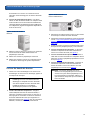
3 Select a location near the server or workstation that will
host the tape drive.
3