1
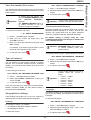
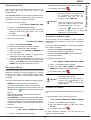
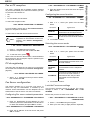
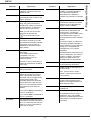
Contents
Dear customer
I
Consumables
I
Preface
Laser Safety Information
For Europe/Asia
For North America
Positions of Safety labels on the machine
Symbols for the main power switch
EMC
Note to users in the United States of
America
Declaration of Conformity
EME Compliance for Canada
Declaration of confomity
Notice to Users in EU Countries
Environmental Information
Software use license
Definition
License
Property
Duration
Warranty
Responsibility
Development
Applicable law
Registered trademarks
Prohibited reproductions
Installation
Location conditions
Cautions of use
Safety information
Safety During Operation
Power Supply
For Fax or Telephone
Paper recommendations
Loading paper in the main unit tray
Handling of paper
Humidity control
Handling the unit
Operator shocks
Moving the unit
Handling the Toner Cartridge
Rules for use symbols
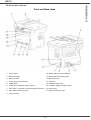
Terminal description
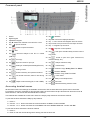
Command panel
Accessing terminal menus
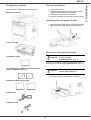
Packaging contents
Device installation
Installing the document feeder
Feed cassette paper insertion
Cartridge installation
Paper delivery stop
Starting your device
Device connection
Device initial setup
Paper insertion in the manual input tray
Use of envelopes
Copy
Simple copy
ECO mode copy
Advanced copying
ID Card Copy mode
Special setup for the copying
Resolution setup
Zoom setup
Collated copy setup
Analysis origin setup
Contrast setup
Brightness setup
Paper type setup
Paper tray selection
Sheet-feed analysis margins setup
Flat-bed analysis margins setup
Left and right printing margins setup
Top and bottom printing margins setup
Format paper setup
1
1
1
1
2
2
3
3
3
3
3
3
Fax
Fax transmission
Print a header page
Immediate transmission
Delayed transmission
Transmission with auto redial
Fax reception
Relay broadcast
Fax answering machine
Saving an access code
Activating / Deactivating the answering
machine
Printing fax messages stored in the
memory
Fax rerouting
Activating rerouting
Setting the re-direction contact
Printing rerouted documents
Rerouting fax messages to a USB memory key
Activating rerouting
Printing rerouted documents
Transmission waiting queue
Performing immediate transmission from
the waiting queue
Consulting or modifying the waiting
queue
Deleting a transmission on hold
Printing a document in waiting or in
deposit
Printing the waiting queue
Cancelling a transmission in progress
MailBoxes (MBX Fax)
Creating an MBX
Modifying the features of a MBX
Printing the contents of a MBX
Deleting a MBX
Printing the MBX list
MBX deposit in your fax
MBX deposit in a remote fax
MBX polling from a remote fax
Deposit and Polling
Placing a document in deposit
Polling a deposited document
4
5
5
5
5
5
5
5
5
6
6
6
7
7
7
8
8
9
9
9
9
9
9
9
9
9
10
10
11
12
12
13
13
13
13
14
15
15
15
15
17
SMS
17
SMS Parameters
Presentation of the sender
18
18
-I-
18
18
19
19
19
20
20
20
20
20
20
21
21
21
21
21
21
22
22
22
22
22
23
23
23
24
24
24
24
24
24
25
25
25
25
25
25
25
26
26
26
26
26
26
26
27
27
27
27
27
27
27
28
28
28
29
29
29
Contents
MB290