1
62
FileMaker Server Getting Started Guide
Registration and customer support
Please take the time to register your product during installation. By registering your software, you may be
eligible for upgrade offers and other customer services. Follow the prompts to provide your registration,
product, and additional information.
To use the FileMaker Server trial version, you must register your software prior to use.
You can register by choosing Help menu > Register Now in FileMaker Server Admin Console. You must
register with a valid license key.
For information about Technical Support and Customer Assistance, visit www.filemaker.com/intl.
To access resources on the FileMaker website such as ready-made solutions and the FileMaker Knowledge
Base, open the FileMaker Server Admin Console Start Page and click FileMaker Tech Support.
If you do not have access to the web, please refer to the FileMaker Service Directory that comes with your
software.
Check for software updates
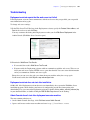
From the FileMaker Server Admin Console Start Page, you can check for software updates. In the Software
Update section, click Check Now. If an update is available, you can click a link to download the update.