1
Important Information
Latest Software
We recommend that you install the most recent software release to stay up-to-date with the latest functional
improvements, stability fixes, security enhancements and protection against new and evolving attacks.
Latest Documentation
The latest version of this document is at:
http://supportcontent.checkpoint.com/documentation_download?ID=12136
For additional technical information, visit the Check Point Support Center
(http://supportcenter.checkpoint.com).
Revision History
Date
Description
08 December 2011
New Smart-1 25 appliance.
The new Smart-1 25 appliance requires a different software image than
the previous appliance. When accessing an image from the Download
Center, use the Smart-1 25B image.
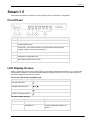
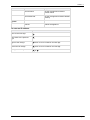
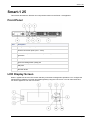
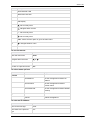
New LCD display and controls ("Front Panel" on page 30)
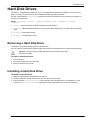
Two high capacity disk drives with improved RAID system ("Hard
Disk Drives" on page 33)
For the previous Smart-1 25 Getting Started Guide, see Smart-1 5 and
25 Getting Started Guide
(http://supportcontent.checkpoint.com/documentation_download?ID=10
949).
23 February 2011
26 January 2011
26 August 2010
Dedicated SmartEvent Server option available from R75 only
("Security Management Installation Type" on page 20)
Improved formatting and document layout
Guide now applies to all Check Point software versions.
Added Rack mounting instructions ("Mounting Smart-1 25 in a
Rack" on page 11).
Updated the First Time Configuration Wizard Instructions ("Using
the First Time Configuration Wizard" on page 18)
First release of the document
Feedback
Check Point is engaged in a continuous effort to improve its documentation.
Please help us by sending your comments
(mailto:cp_techpub_feedback@checkpoint.com?subject=Feedback on Smart-1 5 & Smart-1 25 Getting
Started Guide).