1
Full Manual MD-270
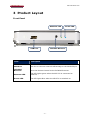
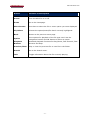
Button
Function or Description
Power
Turn the MD-270 on or off.
Home
Go to the Homepage.
Menu Arrows
Use these to select the file or menu option you want displayed.
Ok/Select
Choose the option/action/file that’s currently highlighted.
Back
Return to the previous menu page.
Option
View options for playback of the file type used. Use the
navigation buttons and OK button to select an option.
Playback
Buttons
Standard playback functions for Play/Pause, Fast Forward, Fast
Reverse and Stop.
Previous/Next
Play or view the previous file or next file in the folder.
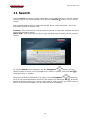
Search
Go to the Search menu.
Info
Toggle information about the file currently playing.
-9-