1
APW15
5.4
Alarm function
Activating the alarm
● Select the required time slot:
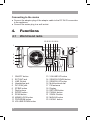
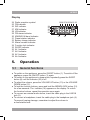
• To select AL1, press the corresponding button (23). The alarm icon (39)
appears on the display.
• To select AL2, press the corresponding button (22). The alarm icon (38)
appears on the display.
• To select AL3, press the corresponding button (21). The alarm icon (37)
appears on the display.
• To select AL4, press the corresponding button (20). The alarm icon (36)
appears on the display.
● To cancel the alarm, press the alarm button once again.
Snooze alarm
● To snooze the alarm, press any button except the ON/OFF button (1).
The alarm sounds again after the snooze time has elapsed.
● To stop the alarm, press the ON/OFF button (1).
The alarm is automatically set for the next day.
5.5
Using the SLEEP function
The default sleep time is: 90 minutes.
● To activate the SLEEP function, press the SLEEP button (8).
● To set the sleep timer (90, 80 ... 0), repeatedly press the SLEEP button (8).
The appliance stops playing after the chosen time has elapsed.
● To check the remaining time, press the SLEEP button (8).
● To cancel the SLEEP function, press the SLEEP button (8) or the ON/OFF
button (1).
11