1
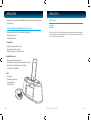
TABLE OF CONTENTS
INTRODUCTION
GETTING STARTED
1
GETTING STARTED
Installing the AC Adapter
Protect your Furniture Installing a Dock Adapter Location of Controls on the Main Unit
Power ON/OFF
Back Up battery
Back Up Function
4
4
4
5
6
6
6
3 | iLuv
Setting the Clock
Setting the Alarm
Using the Snooze Function
Using the Sleep Function
Listening to your iPhone or iPod
Using the Shaker Speaker
Listening to the Radio
Charging your iPhone or iPod
Adjusting the Brightness of the LCD Screen
Setting the Bass and Treble
Resetting the Unit
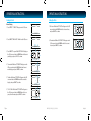
Locate the AC adapter jack on the back of the unit. Insert the AC adapter cable into the jack, and
plug into the wall outlet.
Protect your Furniture
This model is equipped with foam ‘feet’ to prevent the product from moving when you operate the
controls.
Installing a Dock Adapter
OPERATIONAL INSTRUCTIONS
Installing the AC Adapter
7
10
12
13
14
15
15
17
17
17
17
TROUBLESHOOTING GUIDE
18
USER SAFETY GUIDE
19
SPECIFICATIONS
25
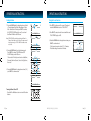
1. How to insert a dock adapter
a. Please use dock adapter that came with your iPod or iPhone
b. Using the correct dock adapter ensures the proper fit for your iPod or iPhone.
c. Gently push the dock adapter down into the universal dock.
d. Carefully place your iPod into the universal dock. Your iPhone or iPod must not be in a case or
“Skin”.
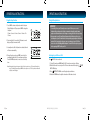
2. How to remove the dock adapter
· Remove your iPod or iPhone first, then carefully remove the dock adapter.
iMM178 | V10M10_IM_EN_01262010
iLuv | 4