1
A28 setup
Adjusting listening settings
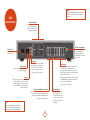
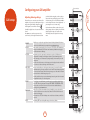
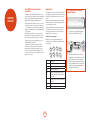
The A28 allows you to customise various features of the
amplifier to fit your system. Use this diagram to help you
navigate through the available configuration options.
In the diagram, the control knob is shown as
.
you have found the setting that you wish to adjust (as
shown on the front panel display), press OK. To adjust
the chosen setting, use the control knob. Press MENU to
store the change and return to volume display mode – or
press OK again to move to the next setting.
Normally, the display shows the source and the current
volume.
Note that the menu will time-out after a short period
without pressing a button or adjusting the control knob,
with the display reverting to the current volume.
Press menu once to enter the setup menu, use the
control knob to cycle through the menu items. When
The following items can be adjusted from the setup
menu:
Balance
This allows you to adjust the output balance between left and right channels. The balance
control is also available directly by pressing the front panel Balance button.
Vol Res
There are three volume-display options to chose from: ‘Std’, ‘Fine’ or ‘Ref’. Standard and
Fine represent different levels of volume-control sensitivity; the Reference setting gives
absolute increments in 0.5dB steps.
I/P Trims
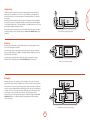
Proc Mode
Input trims are used to compensate for variations in output levels of different source
equipment. If, for example, your CD player is louder at a given volume display value
than other inputs, you can attenuate it by using this setting so that it matches your other
components.
Use the source-select buttons to select the input you wish to adjust, then the control knob
to set (increase or decrease) the input volume for that source.
VOLUMEOOO
BALANCEOO
L,
To record one source while listening to another, turn the control knob until the display
shows ‘Rec ’ followed by the name of the input (Sat, Phono, CD, Tuner, AUX or DVD)
that you wish to record from. The record source control is also available directly by
pressing the front panel Record button.
Max onvol
This can be used to limit the maximum volume the amplifier operates at when it is first
switched on: the A28 comes on at the (reduced) ‘Max. On Volume’ level if the last-used
volume exceeds this value.
If this item is set to ‘Off’, the A28 always comes on at the last used volume, even if this is
very loud.
Reset
Confirming ‘Yes’ restores all amplifier settings to their factory defaults.
,R
RES REF
RES FINE
RES STD
I/PoTRIMS
AUX TRM -8 . . . 8
PROC MODE
PROC AV
FIXED 3 . . . 72
REC SRC
REC SAT��PHONO��CD�
TUNER��AUX��DVD
MAX ONVOL
ONVOL OFF
ONVOL 3 . . . 72
RESET0000
E-11
;
VOL RESOO
Processor mode enables you to fix the gain (volume setting) of your A28. The A28 (in
combination with a power amp.) can then be used to drive the front left and right speakers
of a surround-sound system, when fed from a separate processor. The volume of the entire
system can then be controlled using the processor.
Feed the sound from the processor into the AV input, then set the gain of the A28 to match
the amplifiers that drive your other loudspeakers.
REC SRC
‘Power On’ state
English
Configuring your A28 amplifier
NO
YES