1
Using the Control Panel
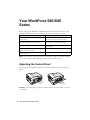
The control panel makes it easy to use all the features of your product. To save energy, the
screen goes dark after several minutes of inactivity. Press any button to wake it up.
1
9
2
3
4
WorkForce 645
only
5
6
7
8
10
Tip: To turn off the “beep” heard when you press a button on the screen, or to reduce
its volume, press F Setup, select Printer Setup, select Sound, and finally select Off. If
you turn off the sound, the dialing sound made when you transmit a fax is also turned
off.
Number
Description
1
Turns product on/off
2
Press Photo to access the Print Photos menu
3
Press Copy to access your product’s Copy mode
4
View menus and status on the LCD screen
5
Use the arrow keys and OK button to navigate menus
6
Enter numbers, letters, and symbols
7
Press Fax to access your product’s Fax mode
8
Press Scan to access your product’s Scan menu
9
Shows wireless network status
10
Resets the active menu selection to its default value
Your WorkForce 545/645 Series 3