1
Normal Operation Mode
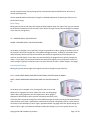
During normal operating mode, the Optoma 3D-RF Emitter interprets 3D signals from the 3D-XL
converter box and controls the Optoma 3D-RF Series Shutter Glasses through RF. No LEDs are active.
Signal Status (Strength) Indicator Mode
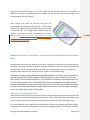
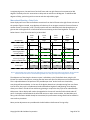
The signal status (strength) indicator provides a visual signal status measurement. The number of lit
green LEDs indicates the quality of the sync signal, with more green LEDs equating to better Sync signal.
The LEDs will display a red moving pattern while the emitter is attempting to acquire a 3D signal and
until a signal is found.
Manual Performance Tuning Mode
The Optoma 3D-RF Emitter and Optoma 3D-RF Shutter Glasses are preprogrammed to work with a wide
variety of TVs and 3D content. The manual performance tuning mode enables the 3D system
performance to be fine tuned. Warning, use of this feature can result in improper or undesirable
operation.
3D Emitter & Glasses Pairing Mode
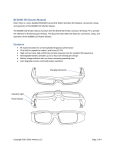
In environments where more than one Optoma 3D-RF Emitter is present, Optoma 3D-RF Glasses should
be paired with the emitter to ensure proper operation. This mode also involves the Optoma 3D-RF
Glasses and is described in greater detail in a subsequent section.
Set Polarity Mode
This mode allows manual setting of lens polarity. During normal operation left lens will open when
rising sync edge is detected. Polarity can be reversed so that right lens will open when rising sync edge
is detected.
Factory Defaults Mode
In the event that the Optoma 3D-RF Emitter is not working properly and other troubleshooting methods
have failed, use the Reset to Factory Defaults mode to attempt recovery of proper operation. Warning:
Any tuning done using Manual Performance Tuning will be erased.
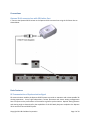
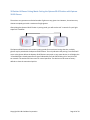
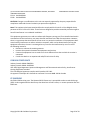
Connecting the Optoma 3D-RF Emitter to Optoma 3D-XL converter box
Use the guide in Connections: Optoma 3D-XL converter
box with 3D Emitter PortOptoma 3D-XL converter box
with 3D Emitter Port to properly connect the Optoma 3DRF Emitter. When the Optoma 3D-XL converter box is
turned on, the Optoma 3D-RF Emitter will turn on as well.
The LEDs will display a red moving pattern while the
emitter is attempting to acquire a 3D signal and until a
signal is found. If the emitter searches for a signal for
Copyright 2011 Bit Cauldron Corporation
Formatte
Page 5 of 24