1
4S Serial RS-232 Mini PCIe card
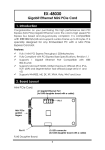
3. Installing the Mini PCIe Card
1.
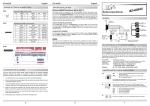
Remove the Mini PCIe card from its protective antistatic packaging, remove the
screw holding the Mini PCIe card to the motherboard and insert the new Mini
PCIe card into the socket.
4S Serial RS-232 Mini PCIe card
4. Installing the Combo PCI Card
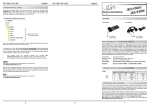
1. To install the Windows drivers, there are two methods, one is to run the setup utility
(StnSetup.exe) in each corresponding folder. The other one is by the Windows’
driver installation Wizard. We recommend you run the setup utility. It will be simpler. However, PLEASE REFRESH HARDWARE OR REBOOT THE SYSTEM IN
CASE YOUR DRIVER DID NOT TAKE EFFECT AFTER RUNNING THE SETUP
UTILITY.
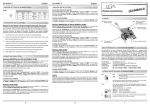
Mini PCIe Socket
The drivers are shipped in the following folders on the driver CD:
E:\IO\MOSCHIP\MCS99xx
2.
Put the Mini PCIe card onto the motherboard and attach it with the screw.
Holding screw
Drivers are in each corresponding folder
Driver Uninstalling Program
3.
Install the serial flat cables. Please mind the pin 1 position marked with the white
dot.
White dot next to pin 1
Driver Installing Program
2
3