1
Installation to PLCM-2 (Not Included)
WARNING
• Installer must verify that the supporting surface will safely support the combined weight of all attached equipment and
hardware.
1
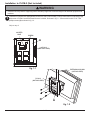
Hold back of computer box (A) against the back of PLCM-2 (not included). Line up locator hole of computer box (A)
with screw of PLCM-2 so that the head of screw is visible, as shown in fig. 1.1. Secure with four #10 x 1/2" TEK
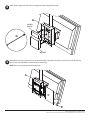
phillips screws (D) as shown in fig. 1.2.
Skip to step 2.
LOCATER
HOLE
SCREW
A
PLCM-2
(NOT INCLUDED)
fig. 1.1
EXTENSION COLUMN
(NOT INCLUDED)
PLCM-2
(NOT INCLUDED)
D
A
fig. 1.2
3 of 5
ISSUED: 03-05-09 SHEET #: 125-9053-1