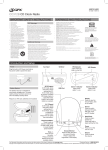
1
Clock and Sleep Timer
Alarm
Radio
Setting the Clock
Setting the Alarm
Tuning the AM or FM Radio
1. If in radio mode, press and hold 1. If in radio mode, press the
1. Press the Source/Al Off button
the Source/Al Off button to turn
Source/Al Off button to turn the
to turn the clock radio on.
the unit off.
unit off.
2. Press the Source/Al Off button
2. Press and hold the Clock/Mem 2. Press and hold the Al1 or Al2
again to switch between the AM
button until the display begins
button until the display begins
and FM radio mode.
to blink, then release the button.
to blink, then release the button.
3. Press the Tun+ and Tun3. Press the Hour button to adjust 3. Press the Hour button to adjust
buttons to adjust the radio to
the hour.
the hour.
the desired frequency.
The PM indicator will light when
the hour is set in the PM.
4. Press the Min button to adjust
the minute.
The PM indicator will light when
the hour is set in the PM.
4. Press the Min button to adjust
the minute.
4. Press and hold the Tun+ and
Tun- buttons to search for the
next available frequency.
Press the Snooze/Sleep button to
delay the alarm for an additional 9
minutes.
An AM antenna is built into the
clock radio. To improve AM radio
reception, adjust the position of the
clock radio.
5. Press the Vol+/- buttons to
adjust the volume.
The Alarm 1 or Alarm 2 indicator
will come on.
6. Press and hold the Source/Al
5. Press the Al1 or Al2 buttons
Off to turn the radio off.
repeatedly to switch between
Setting the Sleep Timer
Saving a Station as a Preset
Radio and Buzzer.
1. Follow the instructions for v.
1. Follow the instructions for
If the alarm is set to Radio, use
2. Press the Snooze/Sleep button
Tuning the AM or FM Radio.
the Vol+/- buttons to adjust the
repeatedly to set the sleep timer
volume of the alarm.
2.
Tune to the desired station.
( 90, 80, 70, 60, 50, 40, 30, 20,
6. Once the set alarm time is
10 min or OFF ).
3. Press and hold the Clock/Mem
reached, the alarm will sound.
button to save the current radio
3. Once the set sleep time has
station as a preset.
To set the other alarm, follow
expired the clock radio will
Tuning to a Preset Radio Station
the above steps and choose the
automatically power off.
alarm not currently set.
1. Follow the instructions for
Tuning the Radio and Saving a
Cancelling the Alarm
Station as a Preset.
1. Follow the instructions for
2. Press the Clock/Mem button
Setting the Alarm.
to cycle through preset radio
2. Press the Al1 or Al2 buttons
stations.
repeatedly until the indicator is
Radio Reception
no longer lit.
Adjust the position of the FM
Snooze and Alarm Reset
Antenna to improve FM radio
After the alarm sounds:
reception.
5. Press the Clock/Mem button to
finish setting the time.
OR
Press the Source/Al Off button to
turn the alarm off until the set alarm
time is reached again.
International Support
To download this User’s Guide in English, Spanish,
or French, or to get answers to frequently
asked questions, visit the support section at:
www.gpx.com
Para descargar este Manual del Usuario en
inglés, español y francés, o para obtener
respuestas a preguntas frecuentes,
visite la sección de apoyo en
Pour télécharger ce guide de l’utilisateur en
anglais, espagnol ou français, ou pour obtenir
des réponses à des questions fréquemment
posées, consultez la rubrique d’assistance sur
www.gpx.com
www.gpx.com
For Warranty Information and the most up-to-date version of this User’s Guide, go to www.gpx.com
Customer Service: 1-888-999-4215
Copyright © 2012 Digital Products International (DPI, Inc.) All other trademarks appearing herein are the property of their respective owners. Specifications are subject to change without notice.