1
N A R C O M 4 H a ndset
2 1 NAR COM 4 H a nd set
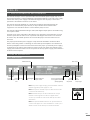
The NARCOM 4 is a multi-functional remote control handset designed to be used with
Naim Audio CD players, integrated amplifiers, preamplifiers, preset tuners and subwoofers.
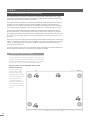
To fit batteries, remove the battery cover and insert the batteries into the body taking care
with their orientation. Replace the battery cover.
21.1 Using NAR C OM
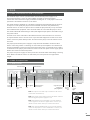
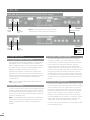
Operation of the NARCOM handset is based around three
types of keys: System Component Keys, Global Keys and
Soft Keys.
System Component Keys keys switch the operation of
the Soft Keys into modes appropriate to each system
component (CD player, preamplifier, etc.).
The CD player can be programmed with a random play
order (from stop with no play order already in place) by
pressing prog followed by 1. Similarly, to program a reverse
play order, press prog followed by 2.
Play orders can be reviewed by pressing prog while the
player is either stopped or playing. The player display will
then scroll through the selected tracks. The prog indicator
on the player display will illuminate when a play order has
Global Keys operate specific component functions
been programmed. To clear the program memory press
regardless of the System Component Key setting and are
and hold the stop key.
available at all times.
CD player Global Keys operate as follows:
prev
Selects the previous track or index point.
next
Selects the next track or index point.
stop
Stops cd play.
play
Begins cd play.
fwd
Fast forwards the cd.
rev Fast reverses the cd.
rpt
Repeats the cd or programmed tracks.
pause
Pauses the cd.
Soft Keys keys operate, in CD mode (selected by the
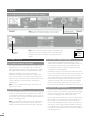
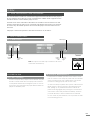
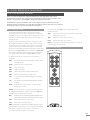
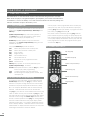
2 1 . 3 NAR C OM 4 K ey s
Disp Key (Soft)
Numeric keys (Soft)
System Component Keys
System Component Keys), as follows:
numeric:Directly selects tracks or, with the prog key, selects tracks for play order programming.
prog:
Confirms CD track play order selections.
Global Keys (CD)
disp:Scrolls through the display options of track, time
and display off.
21.2 P lay Orde r P ro gramming
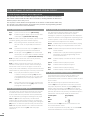
To program a play order select a track number from the
numeric keys followed by the prog key until the desired
selection is complete. During selection, the track number
indicated in the player display will be followed by either
P or — or no display. P indicates that the track is already
selected, — indicates that the track can be selected.
The prog key can also be used to delete tracks from a play
order. To delete a track, press and hold the prog key until
the prog indicator in the CD display illuminates then delete
the track or tracks using the numeric keys followed each
time by a further operation of the prog key. During deletion
the track number indicated in the player display will be
C or — or no display. C indicates that the
track is already deleted, — indicates that the track can be
followed by either
deleted while no display indicates that this is the only track
remaining and therefore cannot be deleted.
E16
Volume and mute keys
Prog Key (Soft)