1
Battery Installation and Replacement
CAUTION:
Danger of explosion if the battery is incorrectly installed. Only install one of the
approved Lithium Batteries listed below.
Battery Installation
The McIntosh MCLK12 Analog Clock uses a long
life Lithium Coin Cell type battery. The MCLK12
will function without a battery when connected to AC
Power. However, the battery will keep the current time
in the event there is an interruption of AC Power and
thus prevents the necessity of having to reset the correct time when AC Power is restored. The MCLK12
may be supplied with a battery depending on the
country where the MCLK12 is purchased. When purchasing a battery for use in the MCLK12 refer to the
following list:
Perform the following steps to install the battery:
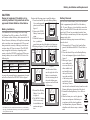
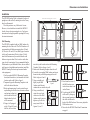
1. Press the tab and lift up on the Backup Battery
Cover and temporarily
place it aside. Refer to
figure 2.
BACKUP
2. Remove the CR2032
BATTERY
Battery from its packaging.
3. Orient the battery so
Figure 2
the + symbol (engraved into one side of the battery) is facing up.
4. Refering to figures 3, 4 and 5 insert the battery
Battery
Socket
Tabs
CR2032
3V
Approved Lithium Batteries
Brand
IEC No.
ANSI/NEDA No.
Energizer
1
CR2032
5004LC1
Panasonic
CR2032(PA/1B)1
5004LC1
Access to the recessed battery compartment is located
on the Rear Panel of the MCLK12. Refer to figure 1.
Figure 3
Figure 4
CR2032
3V
into the socket. Make
sure the right side of the
battery is seated under
the two retaining tabs of
the socket before pressing down on the left side
of the battery.
Figure 5
Battery
Compartment
BACKUP
BATTERY
Figure 1
CR Lithium Coin Cells contain Perchlorate Material - special handling
may apply. For additional information go to www.dtsc.ca.gov/hazaedous
waste/perchlorate/index.cfm
1
5. Reinstall the Backup
Battery Cover. Refer
to figure 6.
6. The MCLK12 Analog
Clock is now ready
for installation, connection and operation.
BACKUP
BATTERY
Figure 6
Battery Removal
The life of the Lithium Battery used in the McIntosh
Clock is approximately the shelf life of the battery
(10 - 15 years). However, it is advisable to remove the
battery from the MCLK12 when the clock is not connected to AC Power for an extended period of time.
This will help to extend battery life and avoid possible
damage to the clock.
Perform the following steps to remove the battery
from the clock:
1. Disconnect the AC Power Cord from the Rear
panel of the McIntosh MCLK12 Clock. Refer to
figure 1.
2. Press the tab and lift up on the Backup Battery
Cover and temporarily place it aside. Refer to
figure 2.
3. Refering to figure 7,
use a small pocket
size screw driver (or
other suitable tool)
and carefully insert
the tip of the tool between the metal tab
of the battery socket
and the left side of
Figure 7
the battery. Then rotate the tool to release the battery from the socket.
Remove the battery from inside of the clock.
5. Reinstall the Backup Battery Cover. Refer to
figure 6.
6. Store the battery in a cool dry place for
future use or dispose of the battery in
accordance with the local regulations
for lithium battery disposal. Batteries
should never be thrown away or incinerated.
CR2032
3V
3