1
Routine Maintenance
Cleaning the Media Path
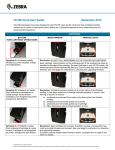
8. Rotate the two side clips on the platen roller upward.
9. Remove the platen roller from the printer.
10. Clean the platen roller.
11/15/10
a.
Using the swab, thoroughly clean the platen roller.
b.
Allow the solution to evaporate.
HC100 User Guide
61207L-002 B
49