1
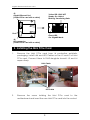
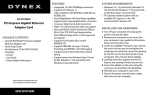
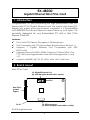
Gigabit Ethernet Mini PCIe Card
J5:
Gigabit Ethernet Port
(to Mini PCIe card with a cable)
Yellow LED: LINK/ACT
Steady On: Linked
Blinking: Transferring Data
Pin #1
Green LED:
On: Gigabit Mode
J4:
LED connector
(to Mini PCIe card with a cable)
3. Installing the Mini PCIe Card
1.
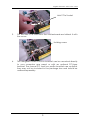
Remove the Mini PCIe card from its protective antistatic
packaging. Install LAN and LED Cables on the J2 and J3 of Mini
PCIe card. Connect them to RJ45 daughter board’s J5 and J4
respectively.
LAN Cable
LED Cable
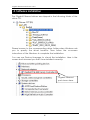
2.
Remove the screw holding the Mini PCIe card to the
motherboard and insert the new Mini PCIe card into the socket.
2