1
Cleaning the LCD Screen
●
Treat the screen gently. The screen on the Photo Frame is made of glass and can easily be
broken or scratched.
● If fingerprints or dust accumulate on the LCD screen, we recommend using a soft,
non-abrasive cloth such as a camera lens cloth to clean the LCD screen.
● M oisten the cleaning cloth with the cleaning solution and apply the cloth to the screen.
WARNING:
Please power off the unit before inserting or removing a memory
card or USB device.
Failure to do so may cause damage to the memory card/USB and
the unit.
To reduce the risk of fire or electric shock, do not expose this
appliance to rain or moisture.
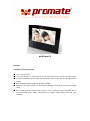
The Promate proFrame.3 is an ultrathin photo frame which is designed to enjoy lasting
memories. The sleek facade has a touch panel for easy navigation of settings and functions.
Expand its memory capacity with the most widely used memory cards – SD/MMC, MS and
USB flash drive. Be informed of daily time and date with its calendar, time and alarm clock
options. From playing images and movies to listening music, the proFrame.3 is a complete
solution for your digital viewing needs!
Features:
•
•
•
•
•
•
•
•
•
•
•
•
•
•
•
Touch menu function
Supports JPEG, BMP and GIF image formats
Supports MP3 and WMA audio files
Supports MPEG1, MPEG2, MPEG4(Divx4.0,Divx5.0, Xvid) and AVI video formats
Memory card: SD/MS/MMC
USB interface: High speed 2.0
Built-in calendar and alarm clock, schedule auto on/off
Slideshow with musical background
Display mode: Slideshow, preview, zoom and rotate function
Adjustable slideshow speed
Adjustable brightness, contrast and saturation
Screen mode 16:9 and 4:3 available
Languages: English, German, Spanish and French language selection
Supports screen saver mode for low power consumption
Ultrathin size: 210mmx164mmx9mm
1