1
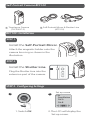
Self-Portrait Camera BFC100
SD Card
Extension Port
1 TimeLapse Camera
2 Self-Portrait Mirror & Shutter Line
(TLC200 f1.2)
(ATS110)
BFC100 - Installation
STEP 1.
Install the Self-Portrait Mirror.
SD Card
Attach the magnetic holder onto the
camera lens ring as shown in the
illustration.
STEP 2.
SD Card
Install the Shutter Line.
Plug the Shutter Line into the
extension port of the camera.
STEP 3. Configuring Settings
1
2
Set up screen
File
StopMotion
File A
File B
1. Switch ON.
2. The LCD will display the
Set up screen.