1
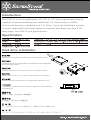
Install the 2.5” hard drive and secure with included M3 screws
Installieren Sie die 2,5 Zoll-Festplatte, anschließend mit den beigelegten
M3-Schrauben fixieren.
Installez le disque dur 2.5” et fixez-le avec les vis M3 fournies
Instale el disco duro de 2,5” y fíjelo con los tornillos M3 incluidos.
Utilizzare quindi le viti M3 per il montaggio delle hard disk da 2,5”
Установите 2.5-дюймовый жесткий диск и закрепите прилагаемыми болтами M3
安裝2.5”硬碟,並以內附的沉頭M3螺絲鎖固。
安装2.5”硬盘,并以内附的沉头M3螺丝锁固。
2.5” ハードディスクドライブを取り付け、付属のM3ネジで固定します。
2.5" 하드 드라이브를 설치하고 제공된 M3 나사를 사용하여 고정합니다.
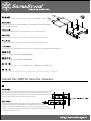
Install the SDP10 into the chassis
A. Internal 3.5” device installation with common 5.25” drive bay cover
1.
Adjust SDP10’s position to ensure that it does not interfere with the drive
bay cover and secure it with screws. If the case does not have any
more mounting holes for adjustment, the SDP10 has additional set of
holes to allow for moving it further into the case.
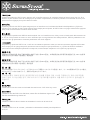
Passen Sie die Position des SDP10 so an, dass es nicht
mit der Schachtabdeckung kollidiert; anschließend mit Schrauben
fixieren. Falls die Montagebohrungen nicht zur Anpassung ausreichen
sollten, verfügt das SDP10 über zusätzliche Bohrungen, damit es nahezu
frei platziert werden kann.