1
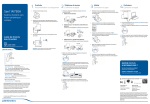
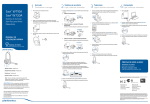
TAKE A GOOD LOOK
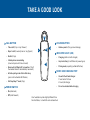
E
A
CALL BUTTON
C
• Take a call (1 tap or say “Answer”)
• Reject a call (1-second press or say “Ignore”)
A
B
• Volume presets (1 tap per level change)
C
D
• Redial (2 taps)
• Very low battery (3 red flashes at powering on)
D
• Pairing mode (repeating red/white flashes)
• Reconnect lost Bluetooth® connection (1 tap if the headset doesn’t automatically reconnect)
E
B
INDICATOR LIGHT (LED)
• Charging (solid red until charged)
• Initiate phone’s voice-dialing (2-second press until tone is heard)
• Activate pairing mode after initial set up (press until red/white LED flashes)
VOLUME BUTTON
MICRO USB CHARGING PORT
• Exit DeepSleep™ mode (1 tap)
• Use with the AC wall charger: 1 hour before first use
2 hours (full charge)
POWER SWITCH
• Do not use headset while charging
• On (slide back)
• Off (slide forward)
Your headset may look slightly different than
the illustration, but will still work as described.