1
8
+
–
Powering the VMP
9V
The VideoMic Pro runs on a standard 9V
battery. (ANS1:1604A or IEC:6LR61).
We recommend using a high quality
lithium or alkaline battery to achieve the
best possible battery life. The VideoMic Pro will run continuously for
over 70 hours with a high quality alkaline or lithium battery.
Battery performance may vary depending on ambient temperature
and battery shelf life, so it is wise to always carry a spare battery.
We suggest always installing a fresh battery when the application is
critical, with no opportunity to re-shoot.
Always remember to switch off the VideoMic Pro when not in use.
Installing the battery
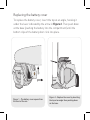
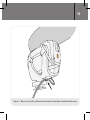
To install the battery, open the battery cover located on the front of
the VideoMic Pro, just under the windshield foam. To remove the
cover, firmly push upwards on the indentation with your finger. Pull
the base of the cover out to completely remove it, and provide access
to the battery compartment (see Figure 1).
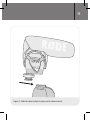
Insert the battery with the negative terminal (-) on top. The battery
will protrude a little until it is pushed in by replacing the battery cover.