1
Chapter 3: SETUP SOFTWARE
Introduction
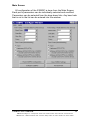
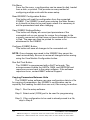
The 232BRC comes with simple setup software for configuring
the A and B ports. The software can run on any PC compatible
computer using Microsoft Windows 95, 98, NT, 2000, or Vista
operating system.
Once the ports are configured, all parameters are saved in nonvolatile memory so the 232BRC can be powered down and used
anywhere without the loss of configuration data. Configurations can
also be saved to a file for setting up more than one 232BRC to the
same configuration.
Connection
A serial (COM) port of the computer should be connected to Port
A of the 232BRC. If the computer’s serial port is a 9 pin D-sub, a
straight through connection cable is required. If the computer’s serial
port is a 25 pin D-sub, the cable should be an XT to AT adapter
cable such as B&B’s model 232CAMR, or a cable that would
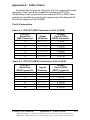
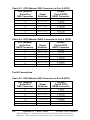
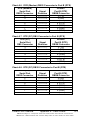
normally be used with a modem. See Appendix A for a complete set
of connection tables to the 232BRC ports.
Remove the screws (4) on the bottom of the 232BRC with a
Phillips screwdriver. Remove the top cover. Install the setup jumper
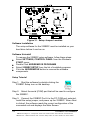
marked JP1. See Figure 3.1 diagram of the PCBD. Power up the
232BRC with the setup jumper installed to put the unit in setup
mode.
NOTE: The setup software cannot recognize the connected
unit if the setup jumper is not installed or if the jumper is
installed after the 232BRC is powered up.
232BRC-0812 Manual
B&B Electronics Mfg Co Inc – 707 Dayton Rd - PO Box 1040 - Ottawa IL 61350 - Ph 815-433-5100 - Fax 815-433-5104
B&B Electronics – Westlink Commercial Park – Oranmore, Galway, Ireland – Ph +353 91 792444 – Fax +353 91 792445
13