1
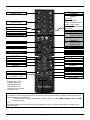
Sound on/off
On/Standby
Numeric keys
in TV mode:
Select sound track/
subtitles, special functions
0/AV
in Radio mode: Select
stations by switching sound
sub-carriers
Option*
Recording
Left arrow key
Red Rewind
Green Stop,
DVR Navigator
Yellow Pause,
playback
Blue Fast forward,
Zoom/format
Right arrow key
Down arrow key
OK
Channel list On/Off
Multi-function keys
Up arrow key
SFI (EPG)
TV/Radio mode
Channel +
Info
Back
Volume +
Channel -
Volume Menu on/off
Teletext On/Off*
Freeze frame
jog shuttle on/off
Language selection*
PIP (picture in picture)
Sleep timer
* This function is only
available where the
corresponding data
is broadcast by the
channel on the selected
programme slot.
Remote control option:
by switching on the remote control option, two receivers and one TechniSat TV with the same coding can be
operated using this remote control.
>
To switch over the remote control option, press the button you want (SAT1, SAT2 or TV) and OK
at the same time.
Note:
to use this receiver, the remote control option selected here for the remote control and the remote control
code must match.
3