1
Main Features
TOP VIEW
REAR VIEW
• Digital clock and alarm clock - with independent snooze and dimmer function
• Digital tune FM Radio
• White LCD display with blue back light
• Compatible with most iPods, with an integrated universal dock for charging your iPod
• Last station, volume and function memory
• Stereo speakers
• 3.5mm audio AUX input jack connected to any por
table audio device
• 20 station memory presets
• iPhone incoming call alert
• Wake to iPhone/iPod, radio or buzzer
Main Controls
1.
3.
2.
1.
2.
3.
4.
5.
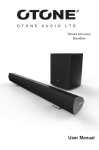
FRONT VIEW
1. DOCK for iPod and iPhone
2. SNOOZE/SLEEP/LIGHT
- Alarm snooze/Sleep selecting /LCD brightness adjustment
3. FM ANT -FM antenna lead
4.
-Power input jack
5. AUX IN -3.5mm auxiliary input jack
Function operation
Power On:
Input DC 5V into the Input Source at the back of the music station, light the display and clock appears, then tap “ POWET ”
lab.
4.
1.
2.
3.
4.
5.
6.
7.
/MEM/SET
POWER
FUNCTION
/TVOL-/AL MODE
VOL+
/T+
5.
6.
- Play and pause/Memory/Clock setting
- Power on or off
- Mode alternation
- Search-/Last/Backward
- Volume down /Alarm mode
- Volume up
7.
Music Play:
1. IPHONE operation:
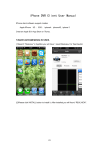
The music station will enter to “IPHONE” function directly when power on. Dock iPhone/iPod on the iPod dock,and play
the music from iPhone/iPod.(iPod/iPhone can be charged when the main unit connects to power).
Pause:
Under “IPHONE/IPOD” mode, press “
” for pause. (Note: there is no “
played or paused, but on the iPhone/iPod itself).
- Search +/ Next/Forward
SIDE VIEW
”or “
”on the LCD when iPhone/iPod” is
Music selection:
Press “
/T- ”or “
/T+”for music selection when iPhone/iPod is played or paused.
Backward/Forward:
Press “
/T- ”or “
/T+”and hold it for backward or forward when iPhone/iPod is played or paused.
iPhone incoming call alert:
When there is an incoming call during iPhone music playing, the music station will stop the music and alternate it into
ringtone.
2 . TUNER operation
1.
1. Built-in quality speaker
Manual Tuner or Automatic Tuner:
Press “
/T- “ or “
/T+” for manual tuner, while press “
/T- ” or “
/T+”and hold it for two seconds when enter
to automatic tuner. The tuner will stop automatically when get access to channels.