1
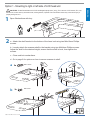
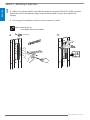
Option 1 - Mounting to right or left side of LCD head unit
1
2
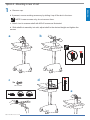
Open Worksurface with key.
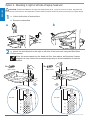
a. Attach the shelf bracket to the bottom of the head unit using two M4x16mm Phillips
screws.
b. Loosely attach the scanner shelf to the bracket using two M4x8mm Phillips screws.
Adjust the shelf to the desired height; ensure that the shelf is level, then tighten the
screws.
c. Close and lock worksurface.
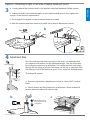
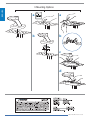
d. Go to page 8 for options on how to secure scanner to shelf.
a
2x
M4 x 16mm
exterior
view
b
2x
interior
view
M4 x 8mm
8
888-97-319-W-01 rev. C • 07/13
3 of 8
ENGLISH
CAUTION: Do Not Exceed Maximum SV LCD Cart Weight Capacity 35 lbs. (16 kg). This is the sum of LCD monitor, CPU, keyboard/mouse, scanner and any worksurface load, including drawers, if present. Failure to heed this caution may cause serious Injury or
property damage to occur.