1
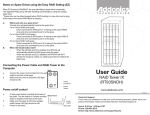
Alarm & LED
Reset Switch
Drive Drawers
Drive Power
Switch and LED
Disk Array 5SA and Disk Array 3SA
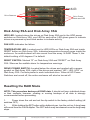
HDD LED: located above the drives on Disk Array 5SA and in the HDD power
switches on Disk Array 3SA, one LED for each drive. LED glows green to indicate
drives are powered up and blink amber to indicate activity.
FAN LED: indicates fan failure.
TEMPERATURE LED: Located next to HDD LEDs on Disk Array 5SA and inside
RESET button on Disk Array 3SA. Indicates temperature beyond range inside the
enclosure. An audible alarm will also sound from the array. In RAID Tower V, the
default setting of 60 degrees C is default.
RESET SWITCH: Marked “R” on Disk Array 5SA and “RESET” on Disk Array
3SA. Silences the audible alarm for temperature warnings.
DRIVE POWER SWITCH: Located below the drives and marked with a power
symbol on Disk Array 5SA, right of the drives and marked “HD1, HD2, HD3” on
Disk Array 3SA. Controls power to each individual drive. When all HD Power
Switches are turned off, the entire enclosure will also be turned off.
Resetting the RAID Mode
NOTE: This procedure destroys all RAID data. It should not harm individual drives
or their contents; however, creating or running backups of all data is strongly
recommended before proceeding.
1.
Power down the unit and set the dip switch to the factory default setting (all
switches OFF).
2.
While holding the SET button with a ballpoint pen, turn the unit on. A long beep
will sound from the Port Multiplier. The SET button may be released once the long beep
stops.
www.addonics.com
Technical Support (M-F 8:30am - 6:00pm PST)
Phone: 408-453-6212
Email: www.addonics.com/support/query/