1
Table of contents
Notices.......................................................................................................... iv
Safety information........................................................................................ v
Care and cleaning........................................................................................ vi
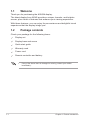
1.1Welcome........................................................................................ 1-1
ii
1.2
Package contents.......................................................................... 1-1
1.3
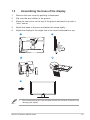
Assembling the base of the display............................................ 1-2
1.4
Display introduction..................................................................... 1-3
1.4.1
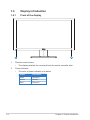
Front of the display.......................................................... 1-3
1.4.2
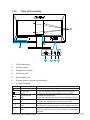
Rear of the display........................................................... 1-4
2.1
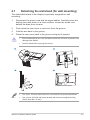
Detaching the arm/stand (for wall mounting)............................. 2-1
2.2
Adjusting the display.................................................................... 2-2
3.1
OSD (On-Screen Display) menu.................................................. 3-1
3.1.1
How to reconfigure........................................................... 3-1
3.1.2
OSD Function Introduction............................................... 3-1
3.2
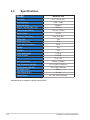
Specifications................................................................................ 3-4
3.3
Get start with media player.......................................................... 3-5
3.3.1 Specification summary..................................................... 3-5
3.3.2
System requirement......................................................... 3-5
3.3.3
Getting to know the media player.................................... 3-5
3.3.4
Remote controller............................................................. 3-6
3.3.5
Getting your media player ready...................................... 3-6
3.4
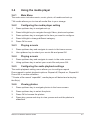
Using the media player................................................................. 3-7
3.4.1
Main Menu....................................................................... 3-7
3.4.2 Configuring the media player setting............................... 3-7
3.4.3
Playing a movie................................................................ 3-7
3.4.4
Playing a music................................................................ 3-7
3.4.5 Configuring the audio playback settings.......................... 3-7
3.4.6
Viewing photos................................................................. 3-7
3.4.7
Setting background music for the slide show................... 3-8
3.4.8 Renaming files/folders..................................................... 3-8
3.5
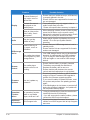
Trouble shooting (FAQ)................................................................ 3-9
3.6
Supported Timing List................................................................ 3-11