1
Listening to your device wirelessly
over Bluetooth®
To listen to your music over Bluetooth® wireless connection, you need to pair your
device with HDMX Stream:
1. Make sure your device has Bluetooth® capability.
2. Press the POWER button to turn on the unit. The Bluetooth® light will flash slowly after
5 seconds.
3. Once the Bluetooth® button beings to flash, press and HOLD the Bluetooth® button for
a few seconds until the Bluetooth® light begins to flash quickly.
4. Follow the instructions of your device to pair the unit.
5. Pair your device with the unit by selecting Stream from your Bluetooth® listings on
your device or selecting YES.
6. Press play on your device and use controls on the unit or remote to adjust to
desired volume.
7. The effective range of the Stream is approximately 30-feet from the Bluetooth® device.
Range can be affected by numerous factors including the Bluetooth® device, wall
materials, etc. If you experience audio drop outs please move the Bluetooth® device
closer to the Stream.
NOTE: Once you have successfully paired your device, you typically will not need to
repeat the above steps. Please ensure the AUX cable is unplugged, the unit source is set
to Bluetooth® and your device has Bluetooth® enabled.
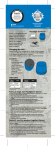
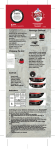
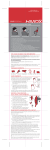
stream wireless stereo speaker
(Fig. 1)
1. Speaker Phone
Button
2. Bluetooth®
Button
3. Play/Pause Button
1
4. Volume Controls
5. Power Button
2
3
4
5
NOTE: When pairing with a computer, please consult your computer manufacturer for
Bluetooth® pairing instructions and/or the latest Bluetooth® Drivers. A pairing code is not
required.
Listening to your device THROUGH THE AUXILIARY
AUX AUDIO JACK
1.Connect the supplied audio cable to the headphone or line-out jack of an audio device
and plug the other end of the cable into the AUX In Audio jack on the back of the unit.
2.Press the POWER button to turn on the unit.
3. Press PLAY on the device and use controls on the unit to adjust to desired volume.
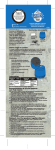
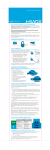
(Fig. 2)
NOTE: Play/pause controls on Stream will not work when using Line-In Audio Jack.
1
4
2
3
1. USB Port
2. DC IN
3. AUX IN
4. Battery Compartment
4
5