1
Contents
1 Working on Your Computer....................................................................................................... 7
Before Working Inside Your Computer.....................................................................................................................7
Turning Off Your Computer....................................................................................................................................... 8
After Working Inside Your Computer........................................................................................................................9
2 Removing and Installing Components................................................................................... 11
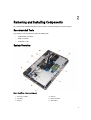
Recommended Tools.............................................................................................................................................. 11
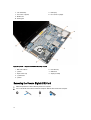
System Overview.................................................................................................................................................... 11
Removing the Secure Digital (SD) Card..................................................................................................................12
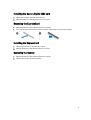
Installing the Secure Digital (SD) Card................................................................................................................... 13
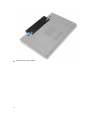
Removing the ExpressCard.....................................................................................................................................13
Installing the ExpressCard......................................................................................................................................13
Removing the Battery............................................................................................................................................. 13
Installing the Battery.............................................................................................................................................. 15
Removing the Base Cover.......................................................................................................................................15
Installing the Base Cover........................................................................................................................................17
Removing the Base Corner Caps............................................................................................................................ 17
Installing the Base Corner Caps............................................................................................................................. 18
Removing the Memory............................................................................................................................................18
Installing the Memory.............................................................................................................................................19
Removing the Hard Drive........................................................................................................................................19
Installing the Hard Drive......................................................................................................................................... 20
Removing the Optical Drive.................................................................................................................................... 20
Installing the Optical Drive..................................................................................................................................... 21
Removing the Wireless Local Area Network (WLAN) Card................................................................................... 22
Installing the WLAN Card....................................................................................................................................... 22
Removing the Wireless Wide Area Network (WWAN) Card..................................................................................22
Installing the WWAN Card..................................................................................................................................... 23
Removing the Network Connector..........................................................................................................................23
Installing the Network Connector...........................................................................................................................24
Removing the Coin-Cell Battery..............................................................................................................................24
Installing the Coin-Cell Battery...............................................................................................................................25
Removing the Power Connector.............................................................................................................................25
Installing the Power Connector.............................................................................................................................. 26
Removing the Heat-Sink Assembly.........................................................................................................................26
Installing the Heat-Sink Assembly..........................................................................................................................27
Removing the Processor.........................................................................................................................................27
Installing the Processor..........................................................................................................................................28