1
Contents
Contents
1 2 2.1 3 3.1 3.2 3.3 3.4 3.5 4 4.1 4.2 5 5.1 5.2 6 Introduction
Getting Started
Quick Start
Overview
Using Twisted Pair Cable
About HDCP
Defining EDID
About HDMI
Recommendations for Achieving the Best Performance
Your HDMI/RS-232/IR Line Transmitter / Receiver
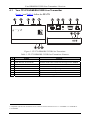
Your TP-573 HDMI/RS-232/IR Line Transmitter
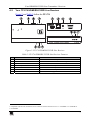
Your TP-574 HDMI/RS-232/IR Line Receiver
Connecting the TP-573 and TP-574
Using the RS-232 ports to control a device via a PC
Wiring the CAT 5 LINE IN / LINE OUT RJ-45 Connectors
Technical Specifications
1 1 2 3 4 4 4 4 5 5 6 7 8 10 10 11 Figures
Figure 1: TP-573 HDMI/RS-232/IR Line Transmitter
Figure 2: TP-574 HDMI/RS-232/IR Line Receiver
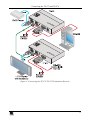
Figure 3: Connecting the TP-573/TP-574 Transmitter/Receiver
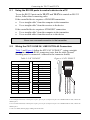
Figure 4: CAT 5 PINOUT
6 7 9 10 Tables
Table 1: TP-573 HDMI/RS-232/IR Line Transmitter Features
Table 2: TP-574 HDMI/RS-232/IR Line Receiver Features
Table 3: CAT 5 PINOUT
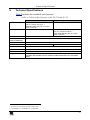
Table 4: Technical Specifications of the TP-573 and TP-574
6 7 10 11 i