1
5.2.4
Editing User Defined Resolutions
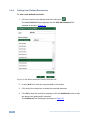
To edit a user defined resolution:
1. Click the required user defined resolution edit button
.
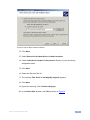
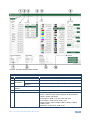
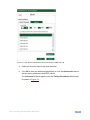
The User Defined Window appears with the CEA 861 Standard Tab
selected as shown in Figure 12.
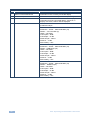
Figure 12: User Defined Resolution Window–Standard Tab
2. In the Label field, enter the required label for the button.
3. Click one of the resolutions to select the required resolution.
4. Click OK to save the resolution settings or click the Additional button to edit
the aspect ratio and specific resolution.
The Additional Tab is displayed as shown in Figure 13.
18
850 - Operating the 850 Pattern Generator