1
2x 2x 2x
2x
2x
1x
2x
2x
2x
2x
2x
12x 4x 4x 4x 2x 2x
2x
8x
3
1
2
2
1
3
TWEETER-LEVEL
CONTROL
This speaker system is equipped with a
tweeter-level switch.The normal setting for
this switch is the “0dB” position, which provides an apparently “flat” response.Tweeter
output may be increased according to the
user’s preference, or to compensate for offaxis placement (where the speaker does not
directly face the listening position), by setting the switch to the “+3dB” position.
3
1
TWEETER-LEVEL
CONTROL
This speaker system is equipped with a
tweeter-level switch.The normal setting for
this switch is the “0dB” position, which provides an apparently “flat” response.Tweeter
output may be increased according to the
user’s preference, or to compensate for offaxis placement (where the speaker does not
directly face the listening position), by setting the switch to the “+3dB” position.
4
2
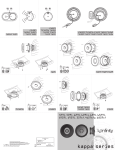
ROTATING TWEETER
This component system includes the
I-Mount™ (patent no. 5,859,917) feature,
an extremely versatile tweeter-mounting
system, which is designed to allow the
tweeter to be aimed toward the listening
position. Since the tweeter’s output becomes
directional at extremely high frequencies,
aiming the tweeter toward the listening
position will improve high-frequency
response and stereo imaging. Refer to
the mounting diagrams. With the tweeter
mounted in the proper location, rock the
tweeter element in the slot and rotate the
entire assembly to aim the tweeter toward
the listening position. Secure the small nut
to lock the angle, then tighten the large
hand nut to lock the rotational position.
ROTATING TWEETER
This component system includes the
I-Mount™ feature, an extremely versatile
tweeter-mounting system, which is designed
to allow the tweeter to be aimed toward the
listening position. Since the tweeter’s output
becomes directional at extremely high
frequencies, aiming the tweeter toward the
listening position will improve high-frequency
response and stereo imaging. Refer to
the mounting diagrams. With the tweeter
mounted in the proper location, rock the
tweeter element in the slot and rotate the
entire assembly to aim the tweeter toward
the listening position. Secure the small nut
to lock the angle, then tighten the large hand
nut to lock the rotational position.