1
Contents
1
Introduction
1
2
2.1
2.2
2.3
3
3.1
3.2
Getting Started
Achieving the Best Performance
Safety Instructions
Recycling Kramer Products
Overview
About Shielded Twisted Pair (STP)/Unshielded Twisted Pair (UTP)
About the Power Connect™ Feature
2
2
3
3
4
4
5
4
4.1
4.2
4.3
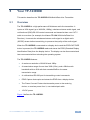
Your TP-121EDID
Overview
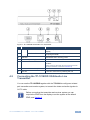
Connecting the TP-121EDID XGA/Audio Line Transmitter
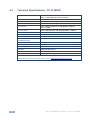
Technical Specifications - TP-121EDID
6
6
7
10
5
5.1
5.2
5.3
5.4
6
6.1
6.2
6.3
6.4
Your TP-123EDID
Overview
Connecting the TP-123EDID XGA/Audio/Data Line Transmitter
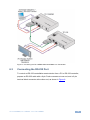
Connecting the RS-232 Port
Technical Specifications – TP123EDID
Your TP-125EDID
Overview
Connecting the TP-125EDID XGA/Audio/Data Line Transmitter
Connecting the RS-232 Port
Technical Specifications – TP-125EDID
11
11
12
14
15
16
16
17
19
20
7
7.1
7.2
7.3
Your PT-110EDID
Overview
Connecting the PT-110EDID XGA/Line Transmitter
Technical Specifications PT-110EDID
21
21
22
24
8
Wiring the TP LINE IN/LINE OUT RJ-45 Connectors
25
9
Acquiring the EDID
26
Figures
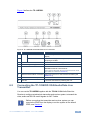
Figure 1: TP-121EDID XGA/Audio Line Transmitter
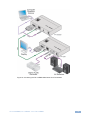
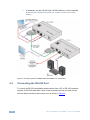
Figure 2: Connecting the TP-121EDID XGA/Audio Line Transmitter
Figure 3: TP-123EDID XGA/Audio/Data Line Transmitter
Figure 4: Connecting the TP-123EDID XGA/Audio/Data Line Transmitter
Figure 5: RS-232 PINOUT Connection
Figure 6: TP-125EDID XGA/Audio/Data Line Transmitter
Figure 7: Connecting the TP-125EDID XGA/Audio/Data Line Transmitter
Figure 8: RS-232 PINOUT Connection
Figure 9: PT-110EDID XGA Line Transmitter
Figure 10: Connecting the PT-110EDID XGA/Line Transmitter
Figure 11: TP PINOUT
7
9
12
14
15
17
19
20
22
23
25
TP-121/3/5EDID, PT-110EDID – Contents
i