1
2 | ENGLISH
EM8622 - Wireless Control Panel
Table of contents
1.0 Introduction ........................................................................................................... 3
1.1 Packing contents ............................................................................................... 3
1.2 Control panel front ............................................................................................. 3
1.3 Control panel inside ........................................................................................... 4
2.0 Installation ............................................................................................................. 4
3.0 Usage.................................................................................................................... 5
3.1 Arm the alarm system ........................................................................................ 5
3.2 Disarm the alarm system ................................................................................... 6
3.2.1 Using control panel to disarm ..................................................................... 6
3.2.2 Using RFID Tag to disarm .......................................................................... 7
3.2.3 Home Mode ................................................................................................ 7
3.2.4 Emergency Call .......................................................................................... 8
3.2.5 Mute Mode ................................................................................................. 8
4.0 Connect to the alarm system ................................................................................. 9
5.0 Connect RFID Tag to control panel........................................................................ 9
6.0 Settings ............................................................................................................... 11
6.1 Enter Setup-state............................................................................................. 11
6.2 Delay Arm........................................................................................................ 11
6.3 SOS Speed dial ............................................................................................... 12
6.3.1 Disable SOS code .....................................................................................13
6.3.2 Enable SOS code ......................................................................................13
6.4 Keyboard tone ................................................................................................. 14
6.4.1 Disable keyboard tone ...............................................................................14
6.4.2 Enable keyboard tone ................................................................................14
6.5 Disarm system by RFID tag ............................................................................. 15
6.5.1 Disable disarming by RFID tag ..................................................................15
6.5.2 Enable disarming by RFID tag ...................................................................15
6.5.3 Disarming silently by RFID tag ...................................................................16
6.6 Power saving mode ......................................................................................... 16
6.6.1 Enable power savig mode..........................................................................17
6.6.2 Disable power saving mode .......................................................................17
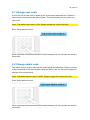
6.7 Change user code ........................................................................................... 18
6.8 Change admin code ........................................................................................ 18
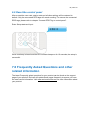
6.9 Reset the control panel .................................................................................... 19
7.0 Frequently Asked Questions and other related information .................................. 19
8.0 Service and support............................................................................................. 20
9.0 Warning and points of attention ........................................................................... 21
10.0 Warranty conditions ........................................................................................... 22
11.0 Declaration of Conformity .................................................................................. 23