1
PRINTING FROM MAKERBOT DESKTOP
USING THE CAMERA
A feed of images from the onboard camera is always available when you’re connected to your
MakerBot Replicator Z18 via Wi-Fi or Ethernet. To view the feed, click the menu icon at the
right side of the status bar to open the monitor panel. As long as you are connected to your
MakerBot Replicator Z18 via a network, the camera image will refresh every few seconds.
When you connect your new MakerBot Replicator Z18 to MakerBot Desktop for the first
time, the camera image may be blurry. You will need to focus it manually to get the best
image possible.
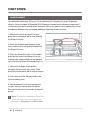
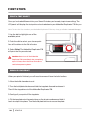
To focus the camera:
1. Connect the MakerBot Replicator Z18 to
MakerBot Desktop via Wi-Fi or Ethernet and
click the status bar to open the monitor panel.
2. Locate the camera. It is mounted inside
the front right corner of the MakerBot
Replicator Z18.
3. Grasp the plastic ring around the lens
and twist it slightly. Avoid touching the camera lens itself.
4. Check the camera feed and wait for the image to refresh. If the image is clearer than it
was before, continue twisting the lens in the same direction. If the image is less clear, start
twisting the lens in the opposite direction.
5. Twist in small increments, and check the camera feed frequently. When the image is
clear and twisting in either direction makes it more blurry, stop making adjustments. You
have successfully focused the onboard camera.
40
MAKERBOT DESKTOP