1
Contents
8 Adjust volume level and sound
effect18
1Important
2
2Notice
4
3 Your Mini Hi-Fi System
6
Safety2
Introduction6
What's in the box
6
Overview of the main unit
7
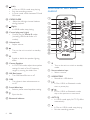
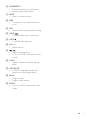
Overview of the remote control
8
4Connect
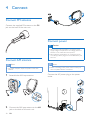
Connect FM antenna
Connect AM antenna
Connect power
5 Get started
Prepare the remote control
Turn on
10
10
10
10
12
12
12
6Play
13
7 Listen to radio
17
Play from a disc or USB
Play audio through Bluetooth
Listen to an external device
Tune to a radio station
Program radio stations automatically
Program radio stations manually
Select a preset radio station
Change AM tuning grid
Adjust volume level
Mute sound
Apply AUTO DJ effect
Apply DJ effects manually
Select a preset sound effect
Enhance bass
Apply NX Bass
Adjust equalizer settings
18
18
18
18
18
19
19
19
9 Other features
20
10 Product information
21
11Troubleshooting
23
Mix sound
Speak or sing with a microphone
Turn the decorative light on or off
20
20
20
Specifications
21
USB playability information
21
Supported MP3 disc formats
22
Maintenance22
About Bluetooth device
23
13
15
15
17
17
17
17
17
EN
1