1
Bluetooth
Pairing a Bluetooth Device for the First Time
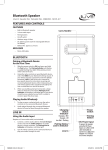
1. Simultaneously power on the unit and begin the pairing process by pressing
and holding the Power/Pair button for approximately 6 seconds.
The indicator will flash red and blue. When pairing, remain within 3 feet
of the unit.
2. Using the native controls on your Bluetooth device, select the IAHB64 in
your Bluetooth settings to pair.
If your device requests a password, enter the default password 0 0 0 0 .
Refer to the user’s manual for your specific device for instructions on pairing
and connecting Bluetooth devices.
After initial pairing, the unit will stay paired unless unpaired manually by the
user or erased due to a reset of the device.
3. If your device should become unpaired or you find it is unable to connect,
repeat the above steps.
Line In
Using the Audio Input
Requires a 3.5mm audio cable (included).
1. Connect a 3.5mm audio cable to the Line In Input on the rear of the
unit and the audio output on an audio device.
2. Use the native controls on the connected device to play your audio
through the unit.
Playing Audio Wirelessly
1. To play or pause the selected track, use the native controls on the connected
Bluetooth Device or press the Play/Pause/Volume button.
2. Audio played through the connected Bluetooth device will now be heard
through the speakers.
Using the Speakerphone
1. When a call is received, a ringtone will sound through the speakers.
2. Press the Power/Pair button to accept the call or accept the call with the
native controls on the connected device.
3. The incoming call received through the device will now be heard through
the speakers.
4. To end the call, press the Power/Pair button or end the call using the native
controls on the connected device.
Note: To re-dial the last dialed number, press the Power/Pair key twice.
LED Indicators
Status
Indicator
Power On
Flashing blue light
Power Off
No light
Charging
Solid red light
Charging Complete
No light
Pairing
Flashing red and blue lights
International Support
To download this User’s Guide in English, Spanish, or French, or to get answers to frequently asked
questions, visit the support section at:
www.iLiveElectronics.com
Para descargar este Manual del Usuario en inglés, español y francés, o para obtener respuestas a
preguntas frecuentes, visite la sección de apoyo en:
www.iLiveElectronics.com
Pour télécharger ce guide de l’utilisateur en anglais, espagnol ou français, ou pour obtenir des
réponses à des questions fréquemment posées, consultez la rubrique d’assistance sur:
www.iLiveElectronics.com
For Warranty Information and the most up-to-date version of this User’s Guide, go to www.iLiveElectronics.com
Customer Service: 1-888-999-4215 | Email Support: prodinfo@dpiinc.com | Email Parts: partsinfo@dpiinc.com
Copyright © 2014 Digital Products International (DPI, Inc.) All other trademarks appearing herein are the property of their respective owners. Specifications are subject to change without notice.