1
Contents
Contents
1 2 2.1 3 3.1 3.2 3.3 4 5 5.1 6 Introduction
Getting Started
Getting Started
Overview
About the Power Connect Feature
Shielded Twisted Pair (STP)/Unshielded Twisted Pair (UTP)
Recommendations for Achieving the Best Performance
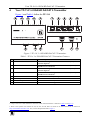
Your TP-114 1:4 XGA/HD DA/CAT 5 Transmitter
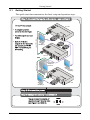
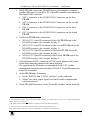
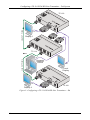
Configuring a TP-114 XGA/HD Line Transmitter – DA System
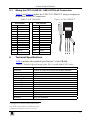
Wiring the CAT 5 LINE IN / LINE OUT RJ-45 Connectors
Technical Specifications
1 1 2 3 3 3 4 5 6 9 9 Figures
Figure 1: TP-114 1:4 XGA/HD DA/CAT 5 Transmitter
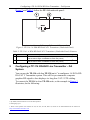
Figure 2: TP-114 1:4 XGA/HD DA/CAT 5 Transmitter (Underside Panel)
Figure 3: Configuring a TP-114 XGA/HD Line Transmitter – DA
Figure 4: CAT 5 PINOUT
5 6 8 9 Tables
Table 1: TP-114 1:4 XGA/HD DA/CAT 5 Transmitter Features
Table 2: TP-114 1:4 XGA/HD DA/CAT 5 Transmitter (Underside Panel) Features
Table 3: CAT 5 PINOUT
Table 4: Technical Specifications of the TP-114 (with 100m CAT 5 cable)
5 6 9 9 i