1
ENGLISH
Contents
Important Safety Instructions . ........................................................... 2
Environmental Declaration ................................................................. 2
Contents................................................................................................. 3
Introduction........................................................................................... 3
What’s in the box................................................................................... 3
VRM Box hardware overview............................................................... 3
Operating system compatibility.......................................................... 4
Installing the software.......................................................................... 4
VRM Box hardware setup..................................................................... 4
VRM Box as the main audio interface . .............................................. 4
VRM Box in conjunction with another audio interface..................... 5
VRM Box control panel software......................................................... 5
What is Virtual Reference Monitoring?............................................... 6
The problem........................................................................................... 6
The solution........................................................................................... 6
The method............................................................................................ 6
VRM technical data............................................................................... 6
Performance specifications................................................................. 8
Latency and CPU information.............................................................. 8
Copyright............................................................................................... 8
Introduction
VRM Box contains a unique technology that allows you to monitor audio on a pair of headphones, as if you were in a real environment listening to real
speakers. There are three environments and 15 pairs of speakers to choose from, creating a total of 24 listening scenarios.
VRM Box has a tactile volume control with a class leading headphone amplifier and external S/PDIF input, complete with built-in sample-rate
conversion, in a pocket-sized package that fits neatly on your desk.
What’s in the box
1 VRM Box
1 Installer CD (includes installation files for Macintosh and Windows PC, and this User Guide)
1 USB cable
1 Register Me Online card
1 Getting Started Guide
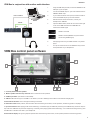
VRM Box hardware overview
2
1. Volume knob
2. VRM “Active” LED
3. Headphone socket
4
4. Kensington Lock port
3
1
5
6
5. USB socket
6. S/PDIF input socket
3