1
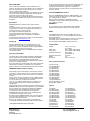
3D and DVI EDID
With recent firmware updates we have included two more
presets in the unit that cannot be edited. There is 3D EDID that
will force a BluRay player in 3D mode with 2CH or 5.1 Audio
and up to 1080p display resolution.
The DVI EDID (du) is presenting a pure DVI EDID to the source
which only contains 128 Byte of EDID data. We included all
popular PC and HD resolution in this preset.
Mainly it is necessary for Apple MAC devices that will require a
pure DVI EDID to activate video output if the sink is not HDCP
compatible.
RS-232 Port
HDMIFIX/DVIFIX has a powerful control and monitoring
interface.
You may download new firmware, control the Presets from a
remote system or monitor your adjustments and setting in a
window as real text on your PC monitor.
The settings are fixed 57600 BAUD, 8N1.
For firmware updates and monitoring you can use the
Hyperterminal program that is integrated in the Windows
Accessories.
A preadjusted configuration file for COM 1 can be downloaded
from our website www.spatz-tech.com.
Monitoring
Once the HDMIFIX/DVIFIX is connected with your PC, all
adjustments you are making are monitored on the windows
screen. If you execute the LEARN mode the complete EDID file
of the display will be shown on the screen.
This powerful function makes the HDMIFIX/DVIFIX a versatile
tool for EDID analysis.
Cable EQ (only DVIFIX)
The DVIFIX has a powerful adaptive Cable EQ installed and is
able to compensate from 50-80m (165-264ft) of DVI/HDMI
cable depending on DVI/HDMI driver and cable quality.
The function is fully automatic and compensates up to 40dB of
cable loss in 4 parametric bands.
Due to this technology it might happen that results change with
selected output resolution. In odd cases you may find that
higher res signals are compensated better than lower res video.
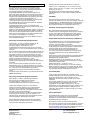
FIRMWARE UPDATE (only for experts)
Unfortunately we have learned that not all firmware of todays
products is in a mature state forcing us to provide bug fixes for
other vendors products or allow new resolutions to be added to
our table.
For this reason we have integrated a firmware update function
that allows you to install new software in the HDMIFIX/DVIFIX
to correct problems or provide new functionality.
To do so , you need the update file from our website “*.txt “
and a terminal program like the Hyperterminal described
already earlier.
Please connect the RS-232 adaptor with COM 1 and execute the
HDMIFIX/DVIFIX.ht file from your desktop that you downloaded
from our website. This config file will execute the integrated
Hyperterminal program and adjust all necessary settings.
To verify that you have a valid connection operate the
HDMIFIX/DVIFIX via front buttons. It will immediately start
returning status messages on the screen.
Now disconnect the HDMIFIX/DVIFIX from power and repower
it with all buttons pressed for 5s. You can see the countdown
sequence in the terminal window.
Once the unit is ready to receive the file it will display “dL”
in the display and the terminal window will show the message:
„SOFTWARE DOWNLOAD Erasing Chip Ready“
SPATZ
Mühlhauser Str.5
73344 Gruibingen
Germany
www.spatz-tech.com
In recent released firmware versions we have changed the way
to execute this command, as some customers accidentially
started a download firmware sequence. To activate the
firmware update all 3 buttons have to be pressed at the same
time for 5 seconds.
Transmit FIRMWARE to the unit
Now open TRANSMISSION and select „SEND TEXTFILE“. You
will have to specify the place where your firmware update file
(e.g. „FX080307.txt“) is located.
Once you have confirmed, the transmission will start
immediately. The Video LED is flashing and after approx. 10s
your update has finished.
WARNING !!
Do not remove the power while updating. Units damaged
because of flashing them to death is not under warranty.
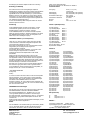
RESET
The HDMIFIX/DVIFIX has 11 factory PRESETs that may be
customized by the user. If you need to RESET the unit please
follow this procedure.
Press MODE and +1 simultanoulsy then power the unit and hold
the buttons until all 3 LEDs are flashing. You have now
succesfully restored the PRESET setting from Table 1.
Technical Data
POWER
DC 5V, 1 x 2,1 mm,
min. 400mA
DVI or HDMI, VGA (DVIFIX)
DVI or HDMI, VGA (DVIFIX)
480i –1080p
VGA-WUXGA, 2k
24-120 Hz
70g
105 x 76 x 30 mm
Video input
Video output
Supported resolutions
Supported framerates
Weight
Dimensions
Table 1 (Factory Presets):
00) Pass Through
01) 720x480p/59.94
02) 720x576p/50
03) 1280x720p/60
04) 1280x720p/50
05) 1920x1080i/60
06) 1920x1080i/50
07) 1920x1080p/60
08) 1920x1080p/50
09) 1920x1080p/24
10) 1024x768/60
11) Iiyama B2403WS
3D) 3D 1080p PCM + DD 5.1
du) DVI EDID 128 Byte
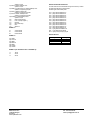
Table 2:
01)
03)
05)
07)
09)
11)
13)
15)
17)
19)
21)
23)
25)
27)
576i/50
1280x720p/50
1920x1080i/50
1920x1080p/50
640x480p/59,9
1280x720p/60
1920x1080p/60
1920x1080p/25
reserved*
reserved*
640x480/75
800x600/50
800x600/75
1024x768/60
02)
04)
06)
08)
10)
12)
14)
16)
18)
20)
22)
24)
26)
28)
720x576p/50
1920x1080i/50
1920x1080p/50
480i/59,94
720x480p/59,9
1920x1080i/60
1920x1080p/24
1920x1080p/30
reserved*
640x480/60
848x480/60
800x600/60
1024x768/50
1024x768/75
Tel. +49-7335-921400
Fax. +49-7335-921402
e-mail:spatz@spatz-tech.de